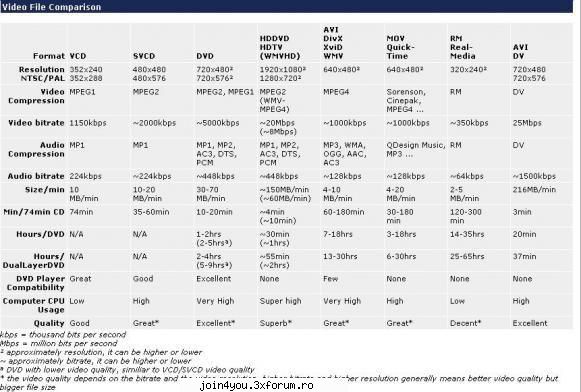
DVD stands for Digital Versatile/Video Disc, DVDR stands for DVD Recordable and DVDRW for DVD ReWriteable. If you're familiar with regular audio/music CDs or regular DVD-Video discs, then you will know what a recordable DVD looks like. A recordable DVD stores up to 2 hours of very good quality DVD-Video, including several audio tracks in formats like stereo, Dolby Digital or DTS and also advanced menu systems, subtitles and still pictures that can be played by many standalone DVD Players and most computer DVD-ROMs. If you choose to lower the video quality it is possible to store several hours video on a recordable DVD using low bitrates and low resolution with video quality more like VHS, SVHS, SVCD, CVD or VCD. It is also possible to have up to 4.37* GB ordinary data or mix DVD-Video and data on a recordable DVD that can be played by most computer DVD-ROMs.
There are three competing DVD Recording standards, DVD-R/DVD-RW and DVD+R/DVD+RW have pretty similiar features and are compatible with many standalone DVD Players and most DVD-ROMs while DVD-RAM has less DVD Player and DVD-ROM compatibility but better recording features.
DVD-R and DVD-RW DVD-R was the first DVD recording format released that was compatible with standalone DVD Players. DVD-R is a non-rewriteable format and it is compatible with about 93% of all DVD Players and most DVD-ROMs. DVD-RW is a rewriteable format and it is compatible with about 80% of all DVD Players and most DVD-ROMs. DVD-R and DVD-RW supports single side 4.37 computer GB* DVDs(called DVD-5) and double sided 8.75 computer GB* DVDs(called DVD-10). These formats are supported by DVDForum.
DVD+R and DVD+RW DVD+R is a non-rewritable format and it is compatible with about 89% of all DVD Players and most DVD-ROMs. DVD+RW is a rewritable format and is compatible with about 79% of all DVD Players and most DVD-ROMs. DVD+R and DVD+RW supports single side 4.37 computer GB* DVDs(called DVD-5) and double side 8.75 computer GB* DVDs(called DVD-10). These formats are supported by the DVD+RW Alliance.
DVD+R DL DVD+R DL or called DVD+R9 is a Dual Layer writeable DVD+R. The dual layered discs can hold 7.95 computer GB* (called DVD-9) and dual layered double sides 15.9* computer GB (called dvd-18).
DVD-R DL DVD-R DL or called DVD-R9 is a Dual Layer writeable DVD-R. The dual layered discs can hold 7.95 computer GB* (called DVD-9) and dual layered double sides 15.9* computer GB (called dvd-18).
DVD-RAM DVD-RAM has the best recording features but it is not compatible with most DVD-ROM drives and DVD-Video players. Think more of it as a removable hard disk. DVD-RAM is usually used in some DVD Recorders.
DVD Sizes
The DVD sizes can be a bit confusing. There are basicly 4 different DVD Sizes,
DVD-5, holds around 4 700 000 000 bytes and that is 4.37 computer GB where 1 kbyte is 1024 bytes* . DVD+R/DVD+RW and DVD-R/DVD-RW supports this format. Also called Single Sided Single Layered. This is the most common DVD Media, often called 4.7 GB Media.
DVD-10, holds around 9 400 000 000 bytes and that is 8.75 computer GB. DVD+R/DVD+RW and DVD-R/DVD-RW supports this format. Also called Double Sided Single Layered.
DVD-9, holds around 8 540 000 000 bytes and that is 7.95 computer GB. DVD+R supports this format. Also called Single Sided Dual Layered. This media is called DVD-R9, DVD-R DL, DVD+R9, DVD+R DL or 8.5 GB Media.
DVD-18, holds around 17 080 000 000 bytes and that is 15.9 computer GB. DVD+R supports this format. Also called Double Sided Dual Layered.
* In the computer world is 1 KB data = 1024 bytes so 4 700 000 000 bytes / 1024 = 4 589 843KB / 1024 = 4482MB / 1024 = 4.37GB. See section 3.3 in the DVDDemystified FAQ here.
Single Layer(4.7GB) write speeds 1x (CLV) = about 58 minutes 2x (CLV) = about 29 minutes 2.4x (CLV) = about 24 minutes 4x (CLV) = about 14.5 minutes 6x (CLV/ZCLV) = about 10-12 minutes 8x (PCAV/ZCLV) = about 8-10 minutes 12x (PCAV/ZCLV) = about 6.5-7.5 minutes 16x (CAV/ZCLV) = about 6-7 minutes
Dual/Double Layer(8.5GB) write speeds 1x CLV = about 105 minutes 2.4x CLV = about 44 minutes 4x CLV = about 27 minutes
Single Layer (4.7GB) read speeds 1x read speed is 1.321MB/s = ~56 minutes 6x CAV (avg. ~4x) read speed is max 7.93MB/s = ~14 minutes 8x CAV (avg. ~6x) read speed is max 10.57MB/s = ~10 minutes 12x CAV (avg. ~8x) read speed is max 15.85MB/s = ~7 minutes 16x CAV (avg. ~12x) read speed is max 21.13MB/s = ~5 minutes
* write speed time and read speed time is not the same because writing requires some extra steps and also does the faster writing above 6x usually use lower write speeds for some parts of the dvd. 4x DVD speed = 36x CD speed. See section 4.2 in the DVDDemystified FAQ here.
Other non-standard special DVD formats:
DVD-VCD is basicly a VCD authored on a DVD. DVD supports the VCD resolution but the audio has to be resampled to 48 khz. If the audio is resampled to 48 khz it is standard DVD-Video. Read more here how to make a such.
DVD-SVCD is basicly a SVCD authored on a DVD. DVD do not supports the SVCD resolution but it may anyway work and the audio has to be resampled to 48 khz like the DVD-VCD. Read more here how to make a such and download a DVD Sample including a DVD-SVCD here.
DVD-MP3 is MP3s burned on a DVD but very few MP3 capable standalone DVD Players supports it because most Players verify DVD as DVD-Video only. Check our DVD Players list for compatibility.
DVD-ISO is MPEG ,MPG, VOB files burned on a DVD without any DVD Authoring(making the vob,ifo files) but very few standalone DVD Players supports it because most Players verify DVD as DVD-Video only. Check our DVD Players list for compatibility.
What is miniDVD / cDVD then? Read here on the miniDVD/cDVD page.
DVD Samples, DVD-SVCD Samples
DVD Trailers, Dolby Digital, DTS, THX Trailers and some other DVD VOB Trailers
To play the DVD Trailers on your computer use WinDVD and just open the VOB file.
If you would like to burn the VOB Trailers on a DVD you can use Tmpgenc DVD Author, add the vob files and burn.
DVD-SVCD Samples, NTSC and PAL DVD-SVCD samples.
Technical Info for DVD-Video
PAL
Video: Up to 9.8 Mbps* (9800 kbps*) MPEG2 video Up to 1.856 Mbps (1856 kbps) MPEG1 video 720 x 576 pixels MPEG2 (Called Full-D1) 704 x 576 pixels MPEG2 352 x 576 pixels MPEG2 (Called Half-D1, same as the CVD Standard) 352 x 288 pixels MPEG2 352 x 288 pixels MPEG1 (Same as the VCD Standard) 25 fps* 16:9 Anamorphic (only supported by 720x576)
Audio: 48000 Hz 32 - 1536 kbps Up to 8 audio tracks containing Dolby Digital, DTS, PCM(uncompressed audio), MPEG-1 Layer2. One audio track must have MPEG-1, DD or PCM Audio.
Extras: Motion menus, still pictures, up to 32 selectable subtitles, seamless branching for multiple storylines, 9 camera angles. And also additional DVD-ROM / data files that only can be read by computer DVD drives.
Total: Total bitrate including video, audio and subs can be max 10.08 Mbps (10080 kbps)
* Mbps = million bits per second * kbps = thousand bits per second * fps = frames per second
For more technical DVD-Video details read the DVDDemystified DVD FAQ section 3.4
NTSC (NTSC Film)
Video: Up to 9.8 Mbps* (9800 kbps*) MPEG2 video Up to 1.856 Mbps (1856 kbps) MPEG1 video 720 x 480 pixels MPEG2 (Called Full-D1) 704 x 480 pixels MPEG2 352 x 480 pixels MPEG2 (Called Half-D1, same as the CVD Standard) 352 x 240 pixels MPEG2 352 x 240 pixels MPEG1 (Same as the VCD Standard) 29,97 fps* 23,976 fps with 3:2 pulldown = 29,97 playback fps (NTSC Film, this is only supported by MPEG2 video) 16:9 Anamorphic (only supported by 720x480)
Audio: 48000 Hz 32 - 1536 kbps Up to 8 audio tracks containing DD (Dolby Digital/AC3), DTS, PCM(uncompressed audio), MPEG-1 Layer2. One audio track must have DD or PCM Audio.
Extras: Motion menus, still pictures, up to 32 selectable subtitles, seamless branching for multiple storylines, 9 camera angles. And also additional DVD-ROM / data files that only can be read by computer DVD drives.
Total: Total bitrate including video, audio and subs can be max 10.08 Mbps (10080 kbps)
* Mbps = million bits per second * kbps = thousand bits per second * fps = frames per second
For more technical DVD-Video details read the DVDDemystified DVD FAQ section 3.4
DVD File/Folder Structure
Explanation:
. BUP = Backup files of the IFO files.
. IFO = The IFO files includes information such as chapters, subtitle tracks and audio tracks.
. VOB = The VOB files contains the actual video,audio,subtitles and menus. Folder Files Explanation AUDIO_TS (undefined) DVD Audio VIDEO_TS VIDEO_TS.BUP VIDEO_TS.IFO The first video play item, IFO, usally a copyright notice or a menu VIDEO_TS.VOB The first video play item, VOB VTS_01_0.BUP VTS_01_0.IFO Title 01, IFO, usually the main movie VTS_01_0.VOB Title 01, VOB 0, the menu for this title VTS_01_1.VOB Title 01, VOB 1, the video for this title VTS_01_2.VOB Title 01, VOB 2, if larger than 1 GB it will be splitted into several vobs VTS_01_3.VOB Title 01, VOB 3 VTS_01_4.VOB Title 01, VOB 4, up to 10(0-9) VOB files if necassary VTS_02_0.BUP VTS_02_0.IFO Title 02, IFO, usually movie extras VTS_02_0.VOB Title 02, VOB 0, the menu for this title VTS_02_1.VOB Title 02, VOB 1, the video for this title VTS_xx_x.BUP VTS_xx_x.IFO And so on VTS_xx_x.VOB VTS_xx_x.VOB VTS_99_9.VOB Up to 99(1-99) titles with max 10(0-9) VOB files each
What is a DVD – poza de Parisss, in Tot ce trebuie sa stii · 48.1KB
Blu-ray Disc (BD) is a next-generation optical disc format meant for storage of high-definition video and high-density data. The Blu-ray standard was jointly developed by a group of consumer electronics and PC companies called the Blu-ray Disc Association (BDA). As compared to the HD DVD format, its main competitor, Blu-ray has more information capacity per layer, 25 instead of 15 gigabytes, but may initially be more expensive to produce. Wikipedia
HD DVD (High Density Digital Versatile Disc or High Definition Digital Video Disc) is a digital optical media format which is being developed as one standard for high-definition DVD. HD DVD is similar to the competing Blu-ray Disc, which also uses the same CD-size (120 mm diameter) optical data storage media and 405 nm wavelength blue laser. HD DVD is promoted by Toshiba, NEC, Sanyo, and, most recently, Microsoft, HP [1], and Intel.
Blu-ray Disc and HD DVD Disc Sizes
BD-R Single layer 25GB or 7.8GB* BD-R Dual layer 50 GB or 15.6GB BD-RE Single layer REwriteable 25 GB or 7.8 GB BD-RE Dual layer REwriteable 50 GB or 15.GB
HD DVD-R Single layer 15 GB or 4.7GB* HD DVD-R Dual layer 30 GB or 9.4GB HD DVD-RW Single layer ReWriteable 15 GB or 4.7GB HD DVD-RW Dual layer ReWriteable 30 GB or 4.7GB HD DVD-RAM 20 GB
* = Small 8cm discs
Video Technical Info for HD DVD and Blu-ray Disc
Blu-ray Disc Video codecs MPEG2 - E-mail E-mail >AVC/H264 - MPEG-4 AVC: HP@4.1/4.0 and MP@4.1/4.0/3.2/3.1/3.0 VC-1 - E-mail E-mail >Video frame size High Definition Video 1920x1080x59.94i, 50i (16:9) 1920x1080x24p, 23.976p (16:9) 1440x1080x59.94i, 50i (16:9) AVC / VC-1 only 1440x1080x24p, 23.976p (16:9) AVC / VC-1 only 1280x720x59.94p, 50p (16:9) 1280x720x24p, 23.976p (16:9) Standard Definition Video 720x480x59.94i (4:3/16:9) 720x576x50i (4:3/16:9) Max video bitrate 40 MBps Audio codecs Dolby Digital up to 5.1 channels (Max 640kbps) Dolby Digital Plus up to 7.1 channels (Max 4.736Mbps) Dolby Lossless up to 9 channels (Max 18.64Mbps) DTS up to 5.1 channels (Max 1.524Mbps) DTS HD up to 9 channels (Max 24.5Mbps) Linear PCM up to 9 channels (Max 27.648Mbps) Subtitles Image bitmap subtitles Text subtitles - select different font styles, sizes and colors for the subtitles, or location on screen, depending on the disc's offerings. Subtitles can be animated, scrolled or faded in and out. Other Features HDMV mode Offers all features of DVD-Video and more. The authoring process is in line with DVD-Video creation. BD-J mode Offers unparalleled flexibility and features, because it is based on the Java runtime environment. It allows for extensive interactive applications, and offers Internet connectivity. Maximum total bitrate 48 Mbits Maximum data transfer rate 54 Mbits
HD DVDVideo codecs MPEG2 AVC/H264 - MPEG-4 AVC VC-1 Video frame size High Definition Video 1920x1080x59.94i, 50i (16:9) 1920x1080x24p, 23.976p (16:9) 1280x720x59.94p, 50p (16:9) 1280x720x24p, 23.976p (16:9) Standard Definition Video 720x480x59.94i (4:3/16:9) 720x576x50i (4:3/16:9) Max video bitrate 29.4 Mbits Audio codecs Dolby Digital up to 5.1 channels Dolby Digital Plus up to 7.1 channels Dolby Lossless up to 9 channels DTS up to 5.1 channels DTS HD up to 9 channels Linear PCM up to 9 channels Mpeg Audio Subtitles Image bitmap subtitles Other Features HDi HDi allows interactivity to be authored into a data format using XML and ECMAScript (standardized JavaScript) as its interpreted scripting engine. In contrast, the competing Blu-ray Disc high definition video discs will use either HDMV or BD-J for authoring interactive features. Maximum total bitrate 30.24 Mbits Maximum data transfer rate 36.55 Mbits
Blu-ray Disc and HD DVD Folder and File Structure
Blu-ray Disc BDMV The BDMV directory contains the PLAYLIST, CLIPINF, STREAM, AUXDATA and BACKUP directories. PLAYLIST The PLAYLIST directory contains the Database files for Movie PlayLists. CLIPINF The CLIPINF directory contains the Database files for Clips. STREAM The STREAM directory contains AV stream files. AUXDATA The AUXDATA directory contains Sound data files and Font files. BACKUP The BACKUP directory contains copies of the "index.bdmv” file, the “MovieObject.bdmv” file, all the files in the PLAYLIST directory and all files in the CLIPINF directory.
index.bdmv The “index.bdmv” file stores information describing the contents of the BDMV directory. There is only one index.bdmv file under the BDMV directory and its filename is fixed to “index.bdmv”. MovieObject.bdmv The “MovieObject.bdmv” file stores information for one or more Movie Objects. There is only one MovieObject.bdmv under the BDMV directory and its filename is fixed to “ MovieObject.bdmv “. xxxxx.mpls The “xxxxx.mpls” files store information corresponding to Movie PlayLists. One file is created for each Movie PlayList. The filenames of these files are in the form “xxxxx.mpls”, where “xxxxx” is a 5-digit number corresponding to the Movie PlayList. zzzzz.clpi The “zzzzz.clpi” files store Clip information associated with a Clip AV stream file. The filenames of these files are in the form “zzzzz.clpi”, where “zzzzz” is a 5-digit number corresponding to the Clip. zzzzz.m2ts The “zzzzz.m2ts” files contains a BDAV MPEG-2 transport stream. The names of these files are in the form “zzzzz.m2ts”, where “zzzzz” is a 5-digit number corresponding to the Clip. The same 5-digit number “zzzzz” is used for an AV stream file and its associated Clip information file. sound.bdmv The “sound.bdmv” file stores data relating to one or more sounds associated with HDMV Interactive Graphic streams applications. This file may or may not exist under the AUXDATA directory. If it exists, there shall be only one sound.bdmv file and its filename is fixed to “sound.bdmv “. aaaaa.otf The “aaaaa.otf” file stores the font information associated with Text subtitle applications. The names of these files are in the form “aaaaa.otf”, where “aaaaa” is a 5-digit number corresponding to the Font